
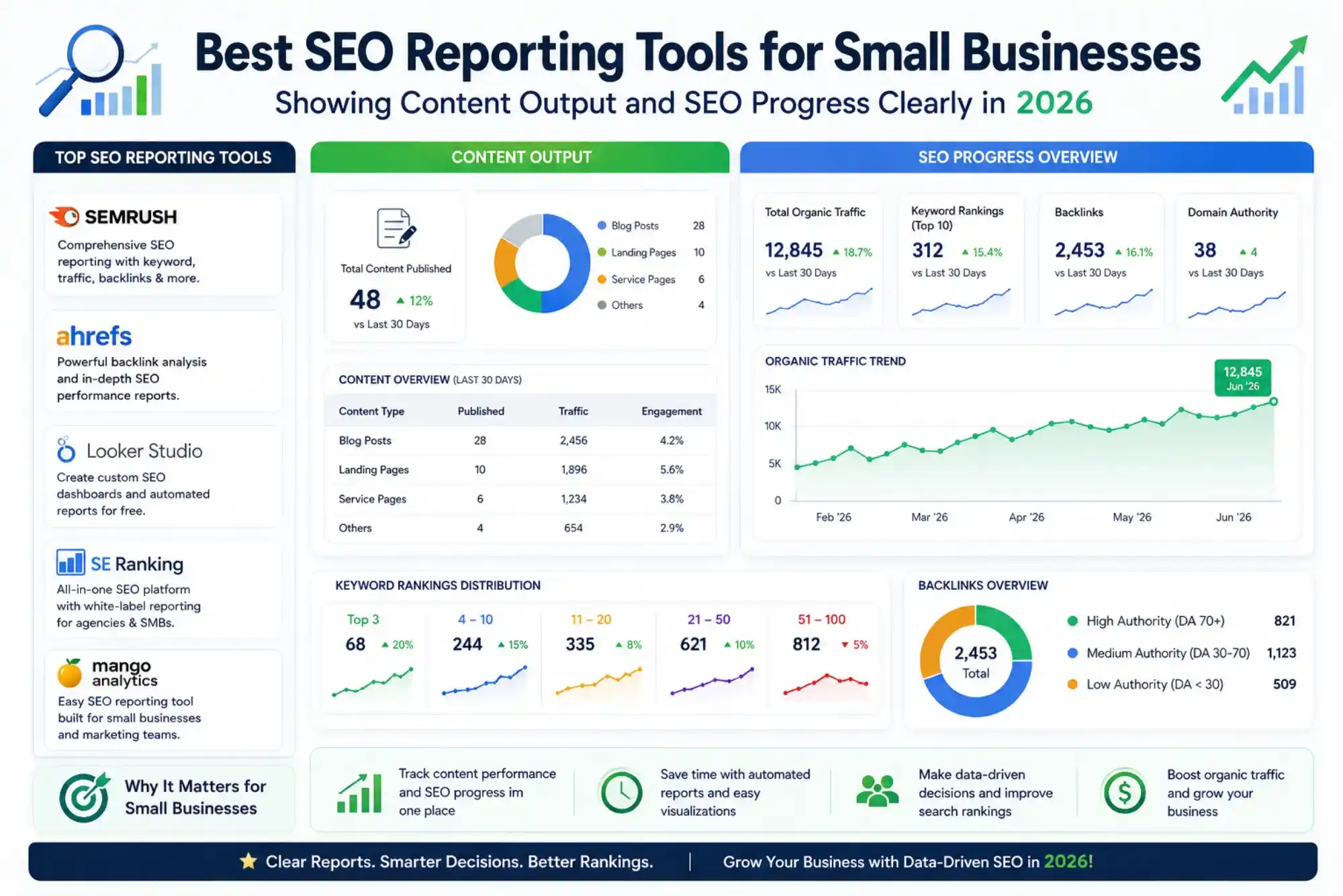
Running a small business means making every tool earn its keep. SEO reporting is one area where the gap between what a business owner needs and what most platforms deliver has historically been frustrating — complex dashboards built for agencies, data-heavy interfaces that require interpretation, and subscription costs that feel steep for a company still growing its organic presence. In 2026, that gap has narrowed considerably. The best SEO reporting tools for small businesses now combine clear visualisation of content performance and ranking progress with affordable pricing and interfaces that do not require an in-house SEO specialist to navigate. This guide covers the tools that deliver the most practical value for small business owners who want to see exactly what their SEO investment is producing.
Why Small Businesses Need Dedicated SEO Reporting
Small business owners often track SEO progress informally — checking Google Analytics occasionally, noting whether traffic seems up or down, and assuming that things are moving in the right direction. The problem with this approach is that it catches problems late, misses opportunities early, and makes it impossible to demonstrate the value of content investment to stakeholders or decision-makers within the business.
Dedicated SEO reporting tools change this by providing a structured, regular view of how the website is performing in organic search — which keywords are gaining or losing positions, which pages are driving the most traffic, how the content published in the past 30 days is performing, and how the site’s overall visibility trends over time. For small businesses that are actively producing content as part of their marketing strategy, having a tool that connects content output to measurable SEO outcomes transforms a vague “we’re working on our SEO” narrative into a clear, quantifiable story about growth.
The reporting also matters for accountability. Small businesses that work with external marketing agencies or freelance content writers need reliable data to assess whether the work being done is producing results. SEO reporting tools that clearly visualise progress against baseline metrics make these conversations significantly more productive.
Best SEO Reporting Tools for Small Businesses in 2026
Google Search Console
Google Search Console remains the most important free SEO tool available to any small business, and its reporting capabilities are more powerful than most owners realise. The Performance report shows every query that has generated impressions on the site, the average ranking position for each query, and the click-through rate — all drawn directly from Google’s own data rather than third-party estimates. For small businesses with limited reporting budgets, Search Console provides a genuine first layer of SEO visibility at no cost.
The most useful view for small business owners is filtering Performance data by page to see which specific content pieces are driving the most organic traffic and which are generating impressions without clicks — a pattern that signals a meta title or description that needs improvement. The Coverage report surfaces any indexing issues, and the Core Web Vitals report identifies page experience problems that may be affecting rankings. For small businesses that publish content regularly, the ability to compare a 28-day window against the equivalent period from the previous year gives a clear picture of year-on-year organic growth that is directly attributable to content and SEO efforts.

Semrush Position Tracking and My Reports
Semrush provides the most complete small business SEO reporting package available in a single platform, combining keyword rank tracking, site health monitoring, competitor comparison, and customisable reports in one interface. The Position Tracking module allows small businesses to set up a campaign with their target keywords grouped by topic or product category, then delivers weekly email reports summarising where each keyword has moved — making it easy to see at a glance whether content published in the past month is generating measurable ranking improvements.
The My Reports feature within Semrush is particularly valuable for small business owners who need to share progress with partners, investors, or stakeholders who are not themselves SEO practitioners. Custom PDF reports can combine keyword performance, organic traffic trends, backlink growth, and competitor visibility data into a single branded document delivered on a set schedule. For small businesses that want professional-looking SEO progress reports without spending hours assembling data from multiple sources, this feature alone justifies the platform’s entry-level subscription cost.
Semrush’s Content Audit tool connects directly to Google Search Console and Google Analytics to provide a page-by-page assessment of content performance — showing which articles are generating traffic and engagement, which have stalled, and which are underperforming relative to their target keywords. For small businesses with an active content programme, this provides exactly the content output and SEO progress visibility that the business needs to make informed decisions about what to produce next.
Google Looker Studio (formerly Data Studio)
Google Looker Studio is a free data visualisation platform that allows small businesses to build automated, live-updating SEO dashboards by connecting directly to Google Search Console, Google Analytics 4, and other data sources. For small businesses that already have the data in Google’s ecosystem and want a clean, shareable dashboard without a monthly subscription, Looker Studio is the most cost-effective reporting option available.
The platform works on a template system — dozens of pre-built SEO dashboard templates are available for free that small businesses can duplicate and connect to their own data in under an hour. A well-configured Looker Studio dashboard shows organic traffic by page, keyword impressions and clicks, position trends for target queries, and month-over-month performance comparisons in a format that is clear enough for a non-technical business owner to interpret without assistance. Once built, the dashboard updates automatically as new data flows in from Search Console and Analytics, eliminating the need to manually pull or format data for any regular reporting cycle.
For small businesses operating in competitive markets — whether locally or in specific industry verticals — understanding how digital visibility translates to business outcomes is increasingly important. Resources covering how businesses in tech and digital sectors approach growth in competitive environments offer useful context for framing SEO investment decisions at a strategic level.
Moz Pro
Moz Pro is widely regarded as one of the most accessible SEO platforms for small businesses and non-specialist users because of its clear interface, plain-language explanations of SEO concepts, and weekly email campaign summaries that require no manual effort to generate. The Campaign feature allows small businesses to track a defined set of keywords and receive a weekly digest showing position changes, new ranking keywords, and significant movements — all formatted in a way that is immediately interpretable without SEO expertise.
The Page Optimisation feature within Moz Pro gives content-level SEO guidance that directly supports the content production workflow for small businesses. For each new piece of content a business publishes, the Page Optimisation report provides a score and a prioritised list of specific improvements — title tag adjustments, internal link additions, keyword usage recommendations — that writers and editors can implement without needing to understand the underlying technical rationale. This bridges the gap between content output and SEO optimisation that many small businesses struggle to close.
Moz’s Link Explorer adds backlink reporting to the picture, showing which pages on the site are attracting inbound links and how the domain’s authority is developing over time. For small businesses that are actively pursuing link-building through guest posting, partnerships, or PR, having a clear view of backlink growth as part of the regular SEO report provides essential context for understanding why rankings are moving in the direction they are.
Ubersuggest
Ubersuggest, developed by Neil Patel, offers an accessible and affordable entry point into structured SEO reporting that is well suited to small businesses that need clear visibility into their keyword rankings and site health without the cost of enterprise-level platforms. Its dashboard provides a weekly keyword ranking summary, a site audit score that tracks technical health over time, and a traffic overview that shows organic session trends alongside the top-performing pages for each period.
The lifetime licence option available through Ubersuggest is a significant financial advantage for small businesses managing tight annual budgets. Rather than incurring a recurring monthly subscription indefinitely, the one-time purchase eliminates ongoing cost while retaining access to rank tracking, site auditing, keyword research, and competitor analysis functionality. For businesses at the early stages of their SEO journey that need a structured reporting foundation without a large upfront commitment to a premium platform, Ubersuggest provides a practical and genuinely useful starting point.
For businesses in service sectors that rely heavily on local and regional search visibility, understanding how to report on and demonstrate local SEO progress — including Google Business Profile performance — is an important extension of standard keyword tracking. Exploring resources on digital marketing approaches for service-based businesses provides useful context for framing local SEO reporting alongside broader organic visibility metrics.
Comparing SEO Reporting Tools for Small Businesses
| Tool | Cost | Automated Reports | Content Performance Tracking | Best For |
|---|---|---|---|---|
| Google Search Console | Free | No — manual access only | Yes — page-level query data | Free baseline reporting for all small businesses |
| Semrush | From approx. $140/month | Yes — scheduled PDF delivery | Yes — Content Audit with GSC integration | Complete reporting with custom client-ready reports |
| Google Looker Studio | Free | Yes — live auto-updating dashboards | Yes — via GSC and GA4 connection | Free customisable dashboards for Google ecosystem users |
| Moz Pro | From approx. $99/month | Yes — weekly email digests | Yes — Page Optimisation reports | Accessible reporting for non-specialist business owners |
| Ubersuggest | Low monthly or lifetime licence | Yes — weekly summaries | Yes — traffic overview and top pages | Budget-conscious small businesses; early-stage SEO |
What Good SEO Reporting Should Show a Small Business
Many small businesses subscribe to SEO tools but never configure them to show the data that actually matters for business decisions. A well-structured SEO report for a small business should answer four core questions every month: Are our target keywords moving in the right direction? Which pages are generating the most organic traffic and why? How does this month compare to the same period last year? And which content published in the past 30 days is already generating measurable search visibility?
Answering these questions requires connecting rank tracking data to traffic data and to content production records — a combination that tools like Semrush and Looker Studio support directly. Businesses that track these four questions consistently over a 12-month period build a clear narrative of SEO progress that is far more convincing to stakeholders than vague claims about “improving our online presence.” The data also makes it significantly easier to identify when a strategy is not working and to make evidence-based adjustments before problems compound. For businesses looking at how CRM and client management tools can complement SEO reporting by connecting search performance to actual customer acquisition data, resources on how CRM platforms integrate with business operations offer useful context for building a joined-up view of digital performance. For authoritative guidance on how Google measures and reports organic search performance, consulting provides the definitive reference for understanding what the data in your reporting tools actually reflects.
Frequently Asked Questions
How often should a small business review its SEO reports?
A weekly automated report covering keyword position changes combined with a monthly deeper review of organic traffic trends and content performance is sufficient for most small businesses. Daily monitoring is unnecessary and can create noise rather than clarity. The monthly review should compare the current period against the same period in the prior year to account for seasonal variation and provide a clear measure of genuine year-on-year growth.
Can a small business manage SEO reporting without a specialist?
Yes, with the right tools. Platforms like Moz Pro, Ubersuggest, and Semrush are specifically designed to surface actionable insights without requiring deep SEO knowledge to interpret. Google Looker Studio dashboards, once set up using a pre-built template, deliver clear visual summaries that any business owner can read. The key is choosing a tool that presents data in plain language rather than one that requires specialist training to navigate.
Which SEO reporting tool is best for a very small budget?
For small businesses with minimal budget, combining Google Search Console with Google Looker Studio provides a free reporting stack that covers keyword performance, traffic trends, content analysis, and page health monitoring without any subscription cost. Ubersuggest’s lifetime licence is the most cost-effective paid option for businesses that want additional keyword tracking and competitive data beyond what Google’s free tools provide.
The best SEO reporting tools for small businesses in 2026 make organic search performance visible, understandable, and actionable without requiring technical expertise or enterprise-level budgets. Google Search Console and Looker Studio provide a powerful free foundation. Semrush offers the most complete reporting stack for businesses ready to invest in a paid platform, with automated deliverables that connect content output to measurable SEO outcomes.
Moz Pro delivers accessible weekly reporting with page-level guidance that directly supports content production decisions. And Ubersuggest gives budget-conscious businesses a structured reporting baseline at a fraction of the cost of premium platforms. The right tool is the one that gets used consistently — delivering a clear view of progress every week and every month so that small businesses can grow their organic visibility with confidence rather than guesswork.
Related Reading: Best All-in-One SEO Tools for Small Businesses in 2026: What to Use and Why